Facility Driver · Microlab IT R&D

Maintenance enters
the security control room.

Facility Driver is the portal designed by Microlab IT’s R&D to keep equipment, machinery and assets under control: what needs checking, what is due, what has been done. It is a standalone system that can be integrated into multi-level platforms such as WinGuard, where every maintenance status becomes part of the control room.

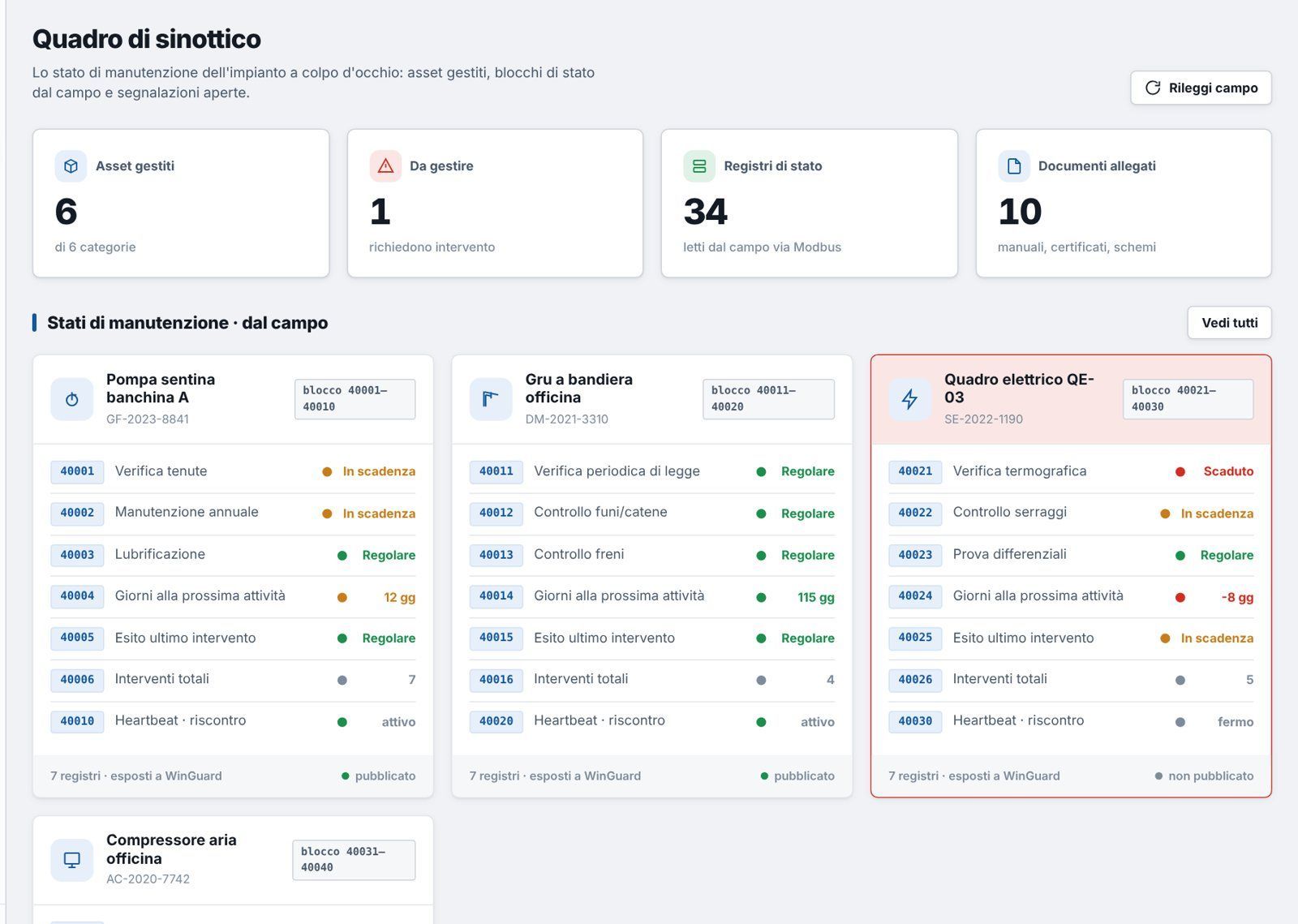
Facility Driver: synoptic overview of assets

The problem

Scattered deadlines, interventions
hard to trace.

Forgotten deadlines

Periodic checks, overhauls and inspections left to spreadsheets and personal reminders.

Incomplete history

Who did what, when and with what outcome: information lost between emails and phone calls.

Maintenance invisible to security

An unmaintained system is a risk, but the control room cannot see it.

What it does

Everything you need
to manage your assets.

Asset register

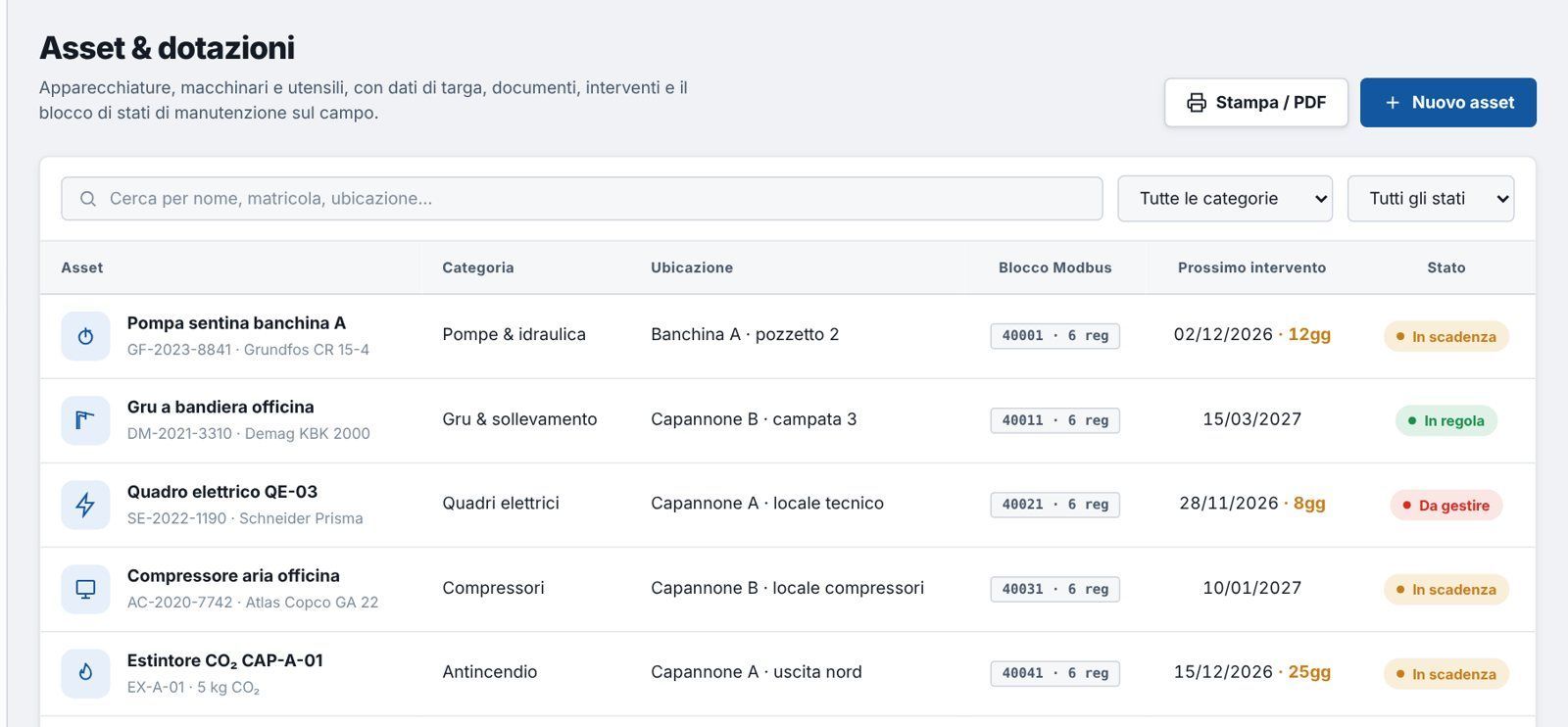
Nameplate data, serial number, category and location of every piece of equipment, machine and asset.

Schedule and reminders

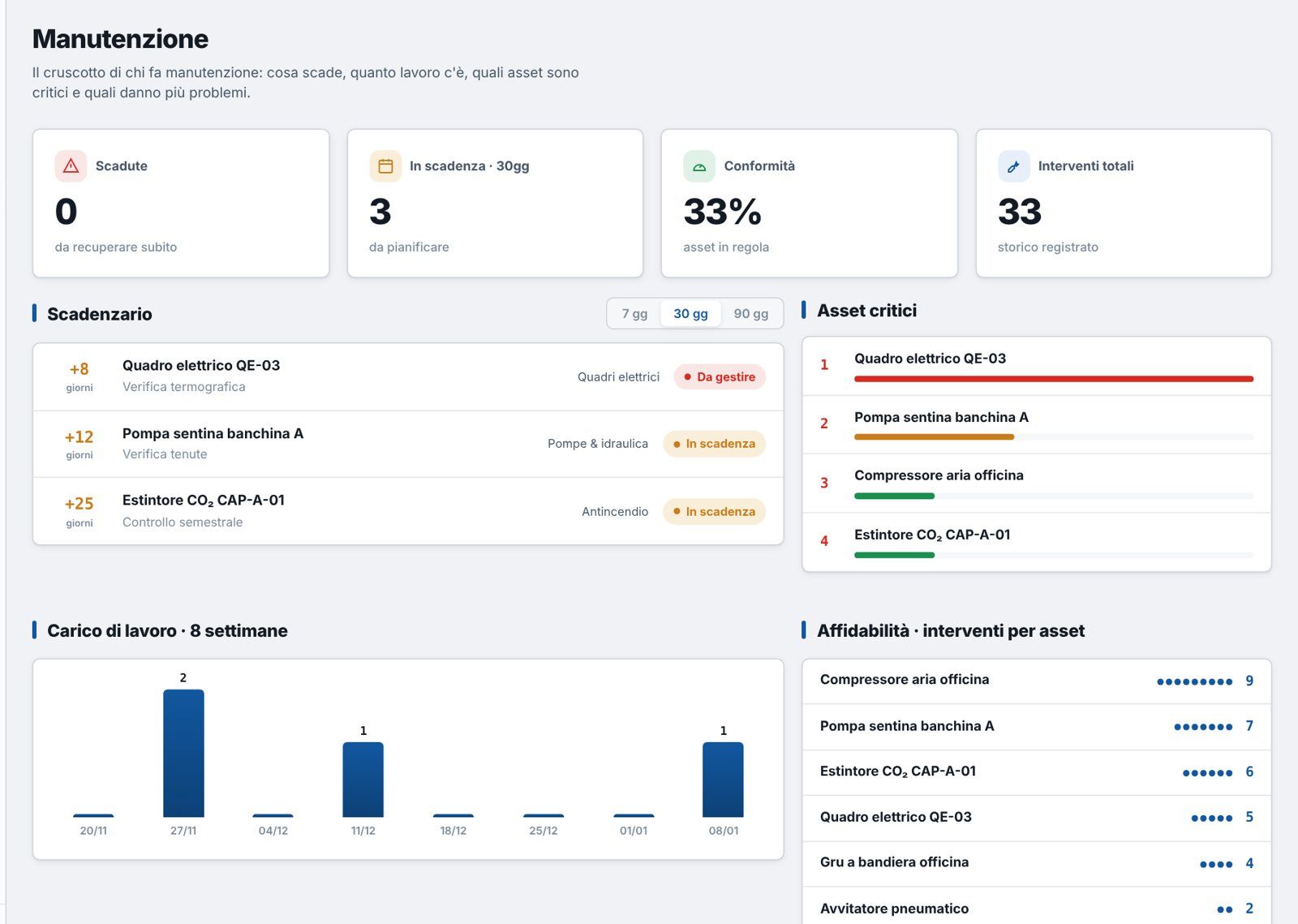
What is due in the next 7, 30 and 90 days: green compliant, yellow due soon, red to be handled.

Scheduled and unscheduled maintenance

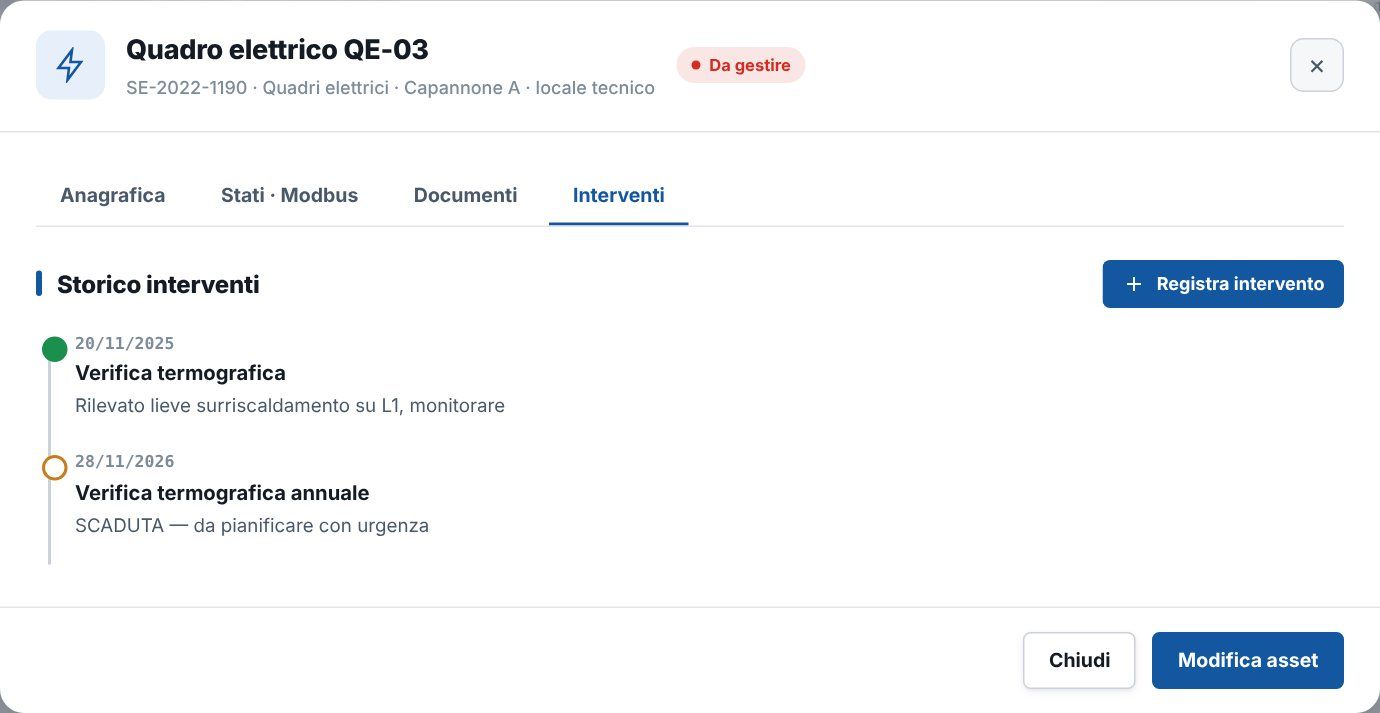
Every intervention logged with date, outcome and notes. The next deadline is recalculated automatically.

Attached documents

Manuals, certificates and drawings always at hand, in each asset’s record.

Roles and permissions

Administrator, manager, operator: everyone sees what they need. Every activity is logged.

PDF reports

An overview of all assets and their status, ready to print or archive.

Every machine, its own record

One label, one QR code,
the machine’s whole history.

Every asset gets a classification label with a QR code. Just scan it to open the machine’s record: nameplate data, maintenance statuses, documents and intervention history, always up to date.

MICROLAB IT FACILITY DRIVER · ASSET TAG B
AC-2020-7742 Workshop air compressor Atlas Copco GA 22 Building B · compressor room
Criticality class
A B C
Category · Compressors
Next check 10/01/2027 Compliant

Try scanning the QR code with your phone: it opens this page, just as in the field it would open the machine’s record.

Workshop air compressor AC-2020-7742 · Compressors · Building B
Compliant
Serial no.
AC-2020-7742
Manufacturer
Atlas Copco
Model
GA 22
Installed
2020
Location
Building B · compressor room
Frequency
Every six months
Class
B · medium criticality
Next check
10/01/2027
Assigned technician
A. Ferri · Microlab IT
  • Air filter replacement Compliant
  • Circuit leak check Compliant
  • Six-monthly overhaul Due in 35 days
  • Safety valve check Compliant
  • Total interventions 9

Every status is a data point that WinGuard reads in real time.

  • Operation and maintenance manual PDF
  • Test certificate PDF
  • System drawing DWG
  • Declaration of conformity PDF
  1. 12/07/2026 · scheduled Six-monthly overhaul · passed by A. Ferri
  2. 15/03/2026 · scheduled Air filter replacement · passed by A. Ferri
  3. 08/01/2026 · unscheduled Pressure switch replaced · fault fixed by G. Conti
  4. 10/07/2025 · scheduled Six-monthly overhaul · passed by A. Ferri
  5. 14/01/2025 · scheduled Circuit leak check · passed by G. Conti
+ Log intervention
AF
Andrea Ferri Maintenance technician · Microlab IT Qualified for this asset
Courses and certificates
  • ✓
    Specialisation certificate · Integrated security systems Issued 03/2024 · valid
  • ✓
    Electrical work PES/PAV · CEI 11-27 Valid until 05/2027
  • ✓
    Thermographic inspection · level 2 operator Issued 09/2023 · valid
  • !
    Work at height and category III PPE Due 11/2026 · renewal scheduled

The technician’s certificates can be checked directly from the machine record.

Demo record with sample data.

Registers and dashboard

All your assets at a glance,
in real time.

The dashboard shows at a glance what is compliant, what is due and what needs handling. Every action, from scanning a QR code to closing an intervention, goes into the activity log.

Facility Driver · Dashboard Updated now
Managed assets 128 in 9 categories
Compliant 112 no action needed
Due · 30 days 13 to schedule
To handle 3 overdue or critical

Asset map each square is a machine

Compliant Due soon To handle

Workload scheduled interventions · 8 weeks

5 9 4 11 7 3 8 6
S1 S2 S3 S4 S5 S6 S7 S8

Compliance compliant assets

88%

Activity log latest operations

  • 10:15 administrator Asset PDF report generated
  • 10:02 system Status published to WinGuard · Electrical panel QE-03
  • 09:31 operator QR scanned · Air compressor AC-2020-7742
  • 09:05 system Due in 7 days · Bilge pump GF-2023-8841
  • 08:40 manager New asset registered · CO₂ extinguisher CAP-A-02
  • 08:12 operator Intervention logged · Jib crane DM-2021-3310

Example · simulated data.

Maintenance statuses as registers

Every check, overhaul or inspection of a machine has its own status: compliant, due soon, overdue or in progress. These are the data WinGuard reads and brings into the control room.

  • Compliant
  • Due soon
  • Overdue
  • In progress

How it works

From the portal
to the control room.

Machine with label SCAN Facility Driver Jib crane DM-2021-3310 Compliant Panel QE-03 Thermographic check Overdue Compliant Air compressor AC-2020-7742 Due soon log updated automatically Gateway publishes statuses connection active WinGuard · control room QE-03 Maintenance alarm QE-03 · check overdue Building A Procedure: schedule intervention Intervention logged QE-03 · status compliant Alarm closed 1 · Scan in the field 2 · Portal 3 · Gateway 4 · WinGuard
  1. 01 The technician scans the QR code on the machine label and opens its record on the phone.
  2. 02 They log the intervention: the status returns to compliant and the next deadline is recalculated automatically.
  3. 03 The gateway publishes maintenance statuses to the PSIM, and if the connection drops, the PSIM notices.
  4. 04 In WinGuard every status is a datapoint: an overdue deadline appears in the control room with its procedure.

The portal

Clear for those who use it
every day.

Facility Driver: Synoptic overview
Synoptic overview The status of every asset at a glance.
Facility Driver: Schedule and workload
Schedule and workload What is due in 7, 30 and 90 days, critical assets and reliability.
Facility Driver: Assets and equipment
Assets and equipment Register, location, next intervention and status.
Facility Driver: Intervention history
Intervention history Every intervention logged, with date and outcome.

Demo screens with sample data.

Who it is for

Wherever there are assets
to keep in good working order.

Industry and plants

Machinery, electrical panels, compressors and lifting equipment.

Hospitality

Technical systems, boiler rooms and safety equipment.

Public bodies and heritage

Buildings, museums and sites with periodic inspection obligations.

Construction and logistics

Equipment, tools and vehicles spread across several sites.

Let’s look at your assets together.

A tailored demo, using your own systems as the example.